

Introduction: Why Your Brand Story on Amazon Matters More Than Ever
The Amazon marketplace is no longer just a place to list and sell products, it’s a competitive brand battlefield. With over 9.7 million sellers and rising advertising costs, creating a strong, memorable brand presence is essential to long-term success. One underutilized yet high-impact tool available to Brand Registered sellers is the Amazon Brand Story.
Amazon’s Brand Story feature allows you to tell customers who you are, what you stand for, and why they should trust your products, all within a dedicated module on your A+ content. But it’s not just about storytelling. A well-structured Brand Story can enhance shopper engagement, improve conversion rates, and increase customer loyalty across your catalog.
This guide will walk you through everything you need to know: from how it works, why it matters, and how to build and optimize a Brand Story that performs.
What Is the Amazon Brand Story?
The Amazon Brand Story is an A+ content module that appears directly above the standard A+ content section on your product detail pages. It offers a dynamic carousel format where sellers can add custom visuals, brand messaging, and key value propositions.
Each Brand Story includes:
- A brand logo and background image
- A headline and body text
- A carousel of up to 19 modules, each with interactive elements like images, text, and links to other product listings or your storefront
Introduced as a way to build brand affinity, the Brand Story goes beyond product features, it communicates your mission, identity, and the bigger narrative behind your catalog. This is crucial for building shopper trust and standing out in crowded categories.
Unlike traditional A+ content, which is product-specific, the Brand Story can appear across all your ASINs, giving you consistent branding across your portfolio.
Who Can Use the Brand Story Feature?
The Brand Story module is only available to sellers who are enrolled in Amazon Brand Registry. This ensures that only legitimate brand owners with trademark protection can access enhanced branding tools.
If you’re not Brand Registered yet, this is a crucial first step. Registering your brand unlocks:
- A+ Content and Brand Story
- Amazon Storefronts
- Sponsored Brands and Video Ads
- Brand Analytics
- Vine reviews and other marketing features
To qualify, you must have an active trademark in the region you’re selling and meet Amazon’s eligibility criteria.
Step 1: Define Your Brand Identity Before You Start
Before logging into Seller Central to build your Brand Story, it’s essential to define the building blocks of your brand identity.
Ask yourself:
- What’s the mission behind your brand?
- What values or causes do you stand for?
- Who is your target customer, and what do they care about?
- What makes your products different from the competition?
A clear and compelling Brand Story draws on emotional connection, not just functional benefits. Don’t be generic, be intentional.
For example:
If you sell eco-friendly home products, don’t just say “sustainable materials.” Show your commitment to the planet with behind-the-scenes content or messages like: “Crafted from coconut husk waste, our zero-waste approach keeps over 2 tons of material out of landfills each year.”
This foundational step makes the next stages more strategic and far more effective.
Step 2: Setting Up the Brand Story in Seller Central
Once your brand identity is clear, you’re ready to build.
Here’s how to set up your Amazon Brand Story:
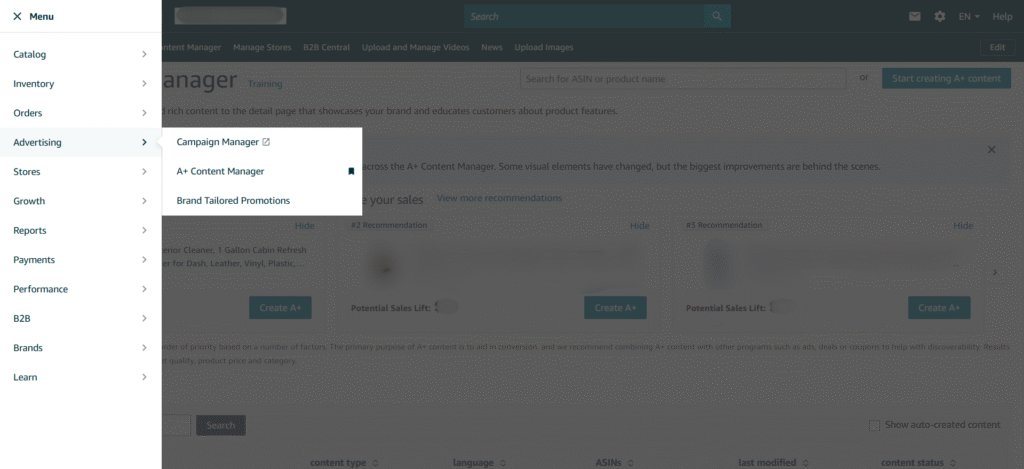
1. Go to A+ Content Manager in Seller Central.
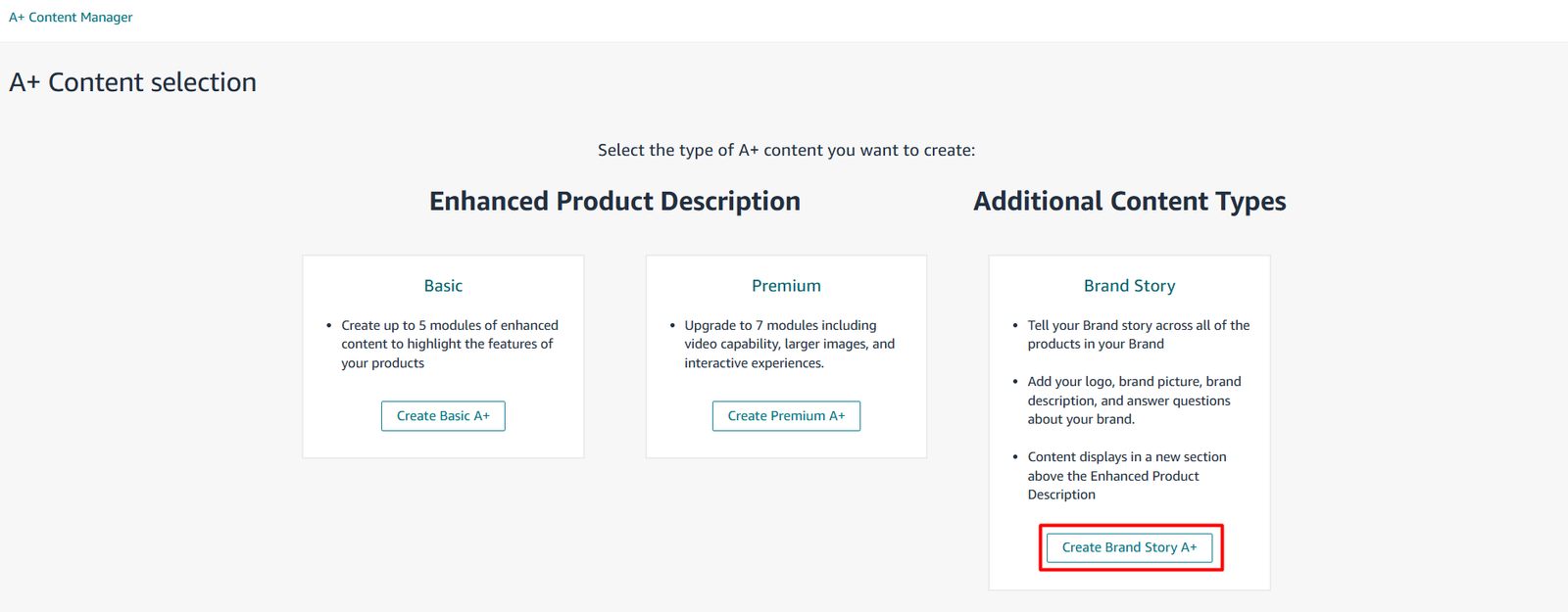
2. Click “Start creating A+ content” and choose “Brand Story” as the content type.

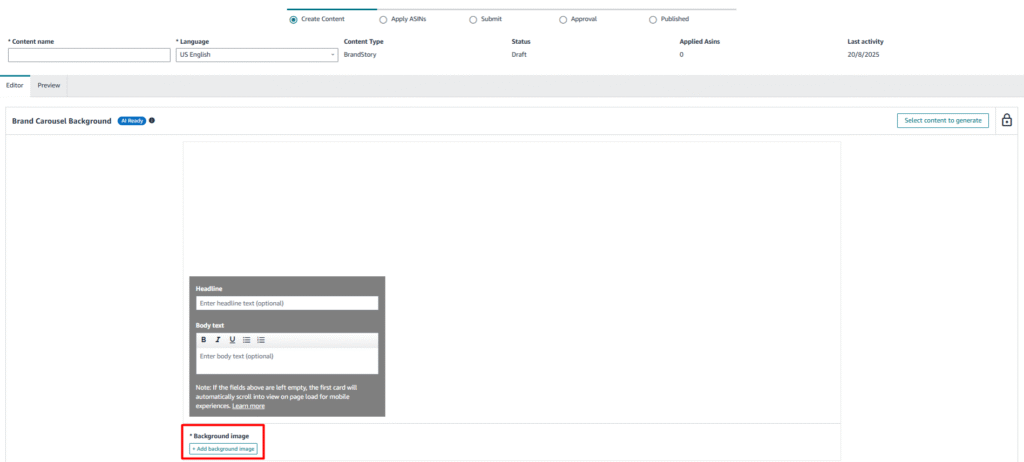
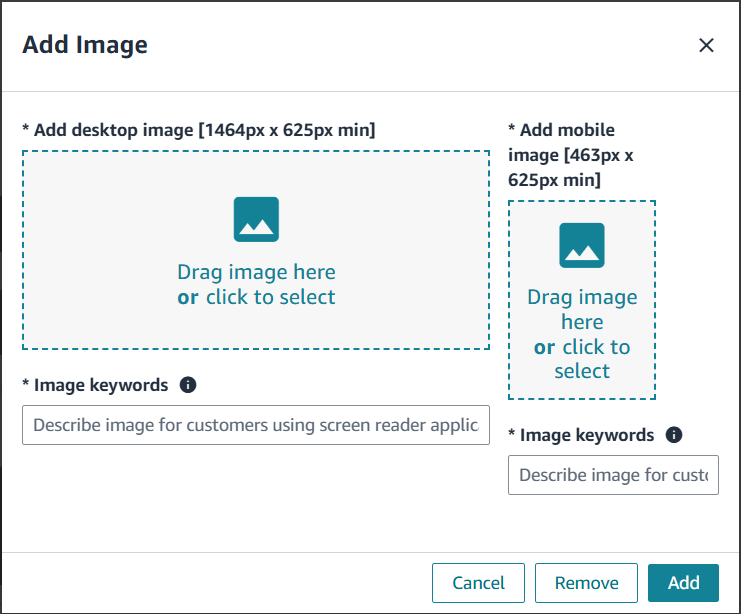
3. Upload a background image (desktop image: 1464×625 px , mobile image: 463×625 px).
4. Add your headline (max 30 characters) and body text (max 135 characters).
5. Add carousel modules—these are the “pages” customers swipe through in the Brand Story.
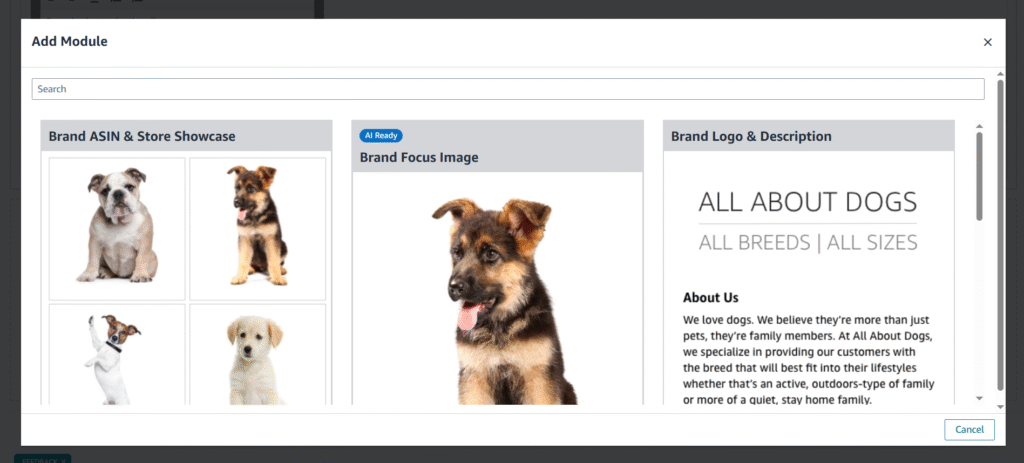
Available modules include:
- Brand Focus (image + text)
- Product and link (image + ASIN links)
- Founder’s Story
- Q&A
- Mission Statement
You can add up to 19 modules, though 3–5 is the sweet spot for usability. Make sure each module has a purpose and ties back to your broader brand narrative.
After previewing and assigning ASINs, submit for Amazon approval (usually within 7 business days).
Step 3: Crafting High-Impact Content That Converts
A strong Amazon Brand Story balances inspiration with strategy. This is not the place for long paragraphs or abstract slogans, it’s where you distill your brand’s essence into snackable, compelling content.
Here’s how to approach each element:
1. Headline and Body Copy
Use the headline to set the tone. This could be a tagline (“Redefining Clean”) or a mission highlight (“Plant-Based Cleaning, Powerful Results”).
The body text should support your headline and immediately tell shoppers why your brand matters. Be clear and concise. Avoid vague language like “quality products” or “trusted brand.”
2. Visuals
Use high-resolution, on-brand imagery. Your background image sets the stage, make it lifestyle-driven, not just a product shot.
Every module image should:
- Reflect your brand’s visual identity
- Reinforce key messaging (sustainability, innovation, family-owned, etc.)
- Be mobile-friendly and clear in carousel format
Need expert visual support? Our creative team at Bits & Atoms has helped brands develop stunning Brand Story imagery that aligns perfectly with their positioning.
3. Product Linking Modules
Strategically highlight products by category or use case. For example:
- “Best-Sellers” carousel linking to top ASINs
- “Starter Kits” for new customers
- “Shop by Solution” if you serve multiple needs (e.g., stain removal vs. pet odor)
These clickable modules drive internal traffic, increase session duration, and boost multi-product purchases.
Step 4: Optimizing for Performance and Discovery
Creating a Brand Story is only the first step. Optimizing it for visibility, conversion, and customer engagement is where long-term value comes in.
Consistency Across Catalog
Assign your Brand Story to all your ASINs to ensure branding consistency across product pages. This keeps your messaging unified and strengthens your identity in the shopper’s mind.
Use Data to Refine
Although Amazon doesn’t offer Brand Story–specific analytics yet, you can monitor changes in:
- Product detail page conversion rate
- Time on page
- Sales velocity
Pair this with Brand Analytics to track how customers interact with your top ASINs, and make adjustments to your Brand Story modules accordingly.
Refresh Regularly
Update your visuals and messaging at least once per quarter. Highlight seasonal campaigns, new product launches, or updated USPs. Fresh content keeps your brand dynamic and relevant.
Step 5: Common Mistakes to Avoid
While the Brand Story tool is simple to use, there are common pitfalls sellers fall into:
- Using stock content or generic messaging with no emotional pull
- Overloading with modules, making the carousel cluttered and hard to navigate
- Lack of product linking, missing the chance to cross-sell
- Visual inconsistency, leading to brand confusion
Each of these issues can undercut the professional impression your Brand Story should create. Aim for clarity, cohesion, and customer relevance.
How a Strong Brand Story Supports Growth
When done well, your Brand Story does more than fill space, it becomes a competitive differentiator. It reinforces the story behind your brand, earns shopper trust, and guides the customer journey with intentional design.
Key benefits include:
- Stronger brand recall: Customers remember stories, not specs.
- Increased conversions: Emotionally connected shoppers buy more.
- Catalog cross-promotion: Highlight related products naturally.
- Professional credibility: Visual storytelling adds polish and authority.
As your brand matures, the Brand Story evolves with it, becoming a flexible, scalable way to express what your business stands for.
Conclusion: Make Your Brand Story Work for You
The Amazon Brand Story isn’t just a feature, it’s a strategic asset. It’s your chance to humanize your brand, connect with shoppers, and guide them through your catalog with clarity and purpose.
To recap:
- Brand Story is available to Brand Registered sellers
- It appears above A+ content and uses carousel modules
- Strong messaging, visuals, and internal linking are essential
- Continuous optimization improves performance over time
If you’re ready to take your Amazon presence from transactional to brand-driven, the Brand Story is where you start.
Want help creating a Brand Story that’s both stunning and strategic?
Our creative team at Bits & Atoms specializes in full-service Amazon content: branding, design, and data-backed performance.
👉 Book a call with our team to discuss your brand’s next step.